# Pi-hole doesn't block according to dashboard
**URL:** https://discourse.pi-hole.net/t/pi-hole-doesnt-block-according-to-dashboard/39178
**Category:** Help
**Created:** [October 8, 2020, 8:39am UTC](https://discourse.pi-hole.net/t/pi-hole-doesnt-block-according-to-dashboard/39178 "2020-10-08T08:39:25Z")
**Posts on this page:** 20
**Page:** 1
### Author:  [@gil80](https://discourse.pi-hole.net/u/gil80)
#### Post date: [October 8, 2020, 8:39am UTC](https://discourse.pi-hole.net/t/pi-hole-doesnt-block-according-to-dashboard/39178/1 "2020-10-08T08:39:25Z")
#### Please follow the below template, it will help us to help you!
### _If you are Experiencing issues with a Pi-hole install that has non-standard elements (e.g you are using `nginx` instead of `lighttpd`, or there is some other aspect of your install that is customised) - please use the [Community Help](https://discourse.pi-hole.net/c/bugs-problems-issues/community-help/36) category._
## Expected Behaviour:
to pick up new IP address after changing it in my router by binding the pi's mac address to 192.168.1.2
## Actual Behaviour:
the pi-hole web UI still shows the old IP 192.168.1.11 even after a router reboot and pi system restart.
## Debug Token:
[https://tricorder.pi-hole.net/drruxpc7sd](https://tricorder.pi-hole.net/drruxpc7sd)
---
### Author:  [@yubiuser](https://discourse.pi-hole.net/u/yubiuser)
#### Post date: [October 8, 2020, 11:27am UTC](https://discourse.pi-hole.net/t/pi-hole-doesnt-block-according-to-dashboard/39178/2 "2020-10-08T11:27:06Z")
Run `pihole -r`, choose reconfigure.
---
### Author:  [@gil80](https://discourse.pi-hole.net/u/gil80)
#### Post date: [October 8, 2020, 2:05pm UTC](https://discourse.pi-hole.net/t/pi-hole-doesnt-block-according-to-dashboard/39178/4 "2020-10-08T14:05:51Z")
I have done that.
In addition, I think the mistake I made was configuring the static IP in the dhcpcd.conf file and the same IP in my router, bound to the raspberry mac address.
The IP was outside of the router's DHCP pool, but I think configuring the IP in both places was the mistake.
I removed the reservation from the router and restarted.
---
### Author:  [@gil80](https://discourse.pi-hole.net/u/gil80)
#### Post date: [October 8, 2020, 2:23pm UTC](https://discourse.pi-hole.net/t/pi-hole-doesnt-block-according-to-dashboard/39178/5 "2020-10-08T14:23:52Z")
Seems that the reconfigure corrected the issue.
But now I cannot access the web ui via [http://pi.hole/admin](http://pi.hole/admin). I get "site can't be reached" error.
p.s. - just to be sure, the way to set up a static IP is either via the PI setup process or the router's DHCP config, not both, correct?
---
### Author:  [@Bucking\_Horn](https://discourse.pi-hole.net/u/Bucking_Horn)
#### Post date: [October 8, 2020, 4:24pm UTC](https://discourse.pi-hole.net/t/pi-hole-doesnt-block-according-to-dashboard/39178/6 "2020-10-08T16:24:37Z")
> [@gil80](#):
>
> p.s. - just to be sure, the way to set up a static IP is either via the PI setup process or the router's DHCP config, not both, correct?
> **Either way or a combination is fine, the latter may also be desired - as long as you verify that IP addresses are identical. (click for more)**
>
> Configuring a static IP address on the Pi-hole machine (usually through `dhcpcd.conf`) would have your Pi-hole claim that address. Whether your router is aware of this or not, it will use that address.
>
> Configuring a DHCP lease reservation in your router would assure that your Pi-hole machine would always be assigned the same fixed IP address if it chose to request a lease via DHCP.
>
> In the case where the Pi-hole machine would be down for any reason, and absent from the network, a DHCP lease reservation would also prevent any other DCHP client from using Pi-hole's designated IP address.
>
> In theory, if you weren't reserving a fixed DHCP lease for Pi-hole, another machine might get assigned Pi-hole's IP, which will compromise your network badly as soon as your Pi-hole machine rejoins your network with an identical static IP.
>
> In practice, such a situation can be avoided by picking an IP address outside of the dynamic DHCP address range.
>
> * * *
> [@gil80](#):
>
> I cannot access the web ui via `http://pi.hole/admin`
Run from a **client** , what's the output of the following command:
```auto
nslookup pi.hole
```
---
### Author:  [@gil80](https://discourse.pi-hole.net/u/gil80)
#### Post date: [October 9, 2020, 12:14am UTC](https://discourse.pi-hole.net/t/pi-hole-doesnt-block-according-to-dashboard/39178/7 "2020-10-09T00:14:36Z")
Thanks for the reply.
The router's DHCP pool is configured from 192.168.1.11 to 192.168.1.254. The Pi is using 192.168.1.2 so no device can claim that ip.
The output of nslookup pi.hole is:
```auto
pi@raspberry:~ $ nslookup pi.hole
Server: 9.9.9.10
Address: 9.9.9.10#53
** server can't find pi.hole: NXDOMAIN
```
---
### Author:  [@jfb](https://discourse.pi-hole.net/u/jfb)
#### Post date: [October 9, 2020, 1:54am UTC](https://discourse.pi-hole.net/t/pi-hole-doesnt-block-according-to-dashboard/39178/8 "2020-10-09T01:54:41Z")
That client is using Quad9 for DNS, not Pi-hole. This is not unusual for the Pi (you are better off in many respects having the Pi use a nameserver other than Pi-hole - otherwise Pi-hole can't repair itself, for example).
We want the output of this command from a client computer other than the Pi itself (and not via ssh session to the Pi terminal).
---
### Author:  [@gil80](https://discourse.pi-hole.net/u/gil80)
#### Post date: [October 9, 2020, 2:06am UTC](https://discourse.pi-hole.net/t/pi-hole-doesnt-block-according-to-dashboard/39178/9 "2020-10-09T02:06:31Z")
Ok, I used that command from WSL2 after exiting Raspberry.

> [@jfb](#):
>
> That client is using Quad9 for DNS, not Pi-hole. This is not unusual for the Pi (you are better off in many respects having the Pi use a nameserver other than Pi-hole - otherwise Pi-hole can't repair itself, for example).
Not sure I fully understand that.
Firstly, when I setup pi-hole I selected Cloudflare, not Quad9 so I don't know why this DNS is there.
Secondly, you mean that it's better for the pi-hole to point/use a DNS which is not the pi-hole's DNS? i.e., 192.168.1.2? (which is also the pihole IP)
Edit:
see below pic:
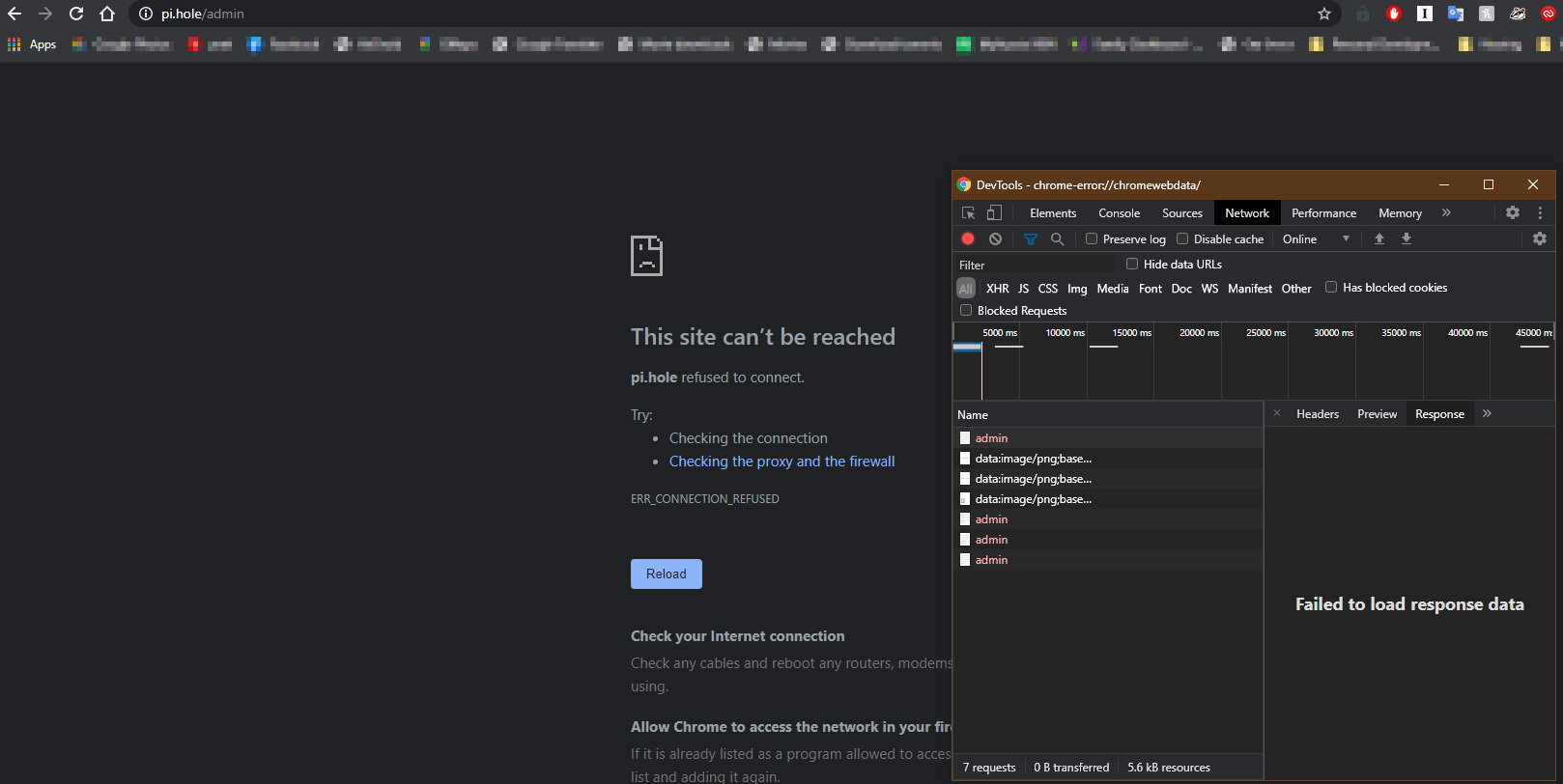
---
### Author:  [@jfb](https://discourse.pi-hole.net/u/jfb)
#### Post date: [October 9, 2020, 2:19am UTC](https://discourse.pi-hole.net/t/pi-hole-doesnt-block-according-to-dashboard/39178/10 "2020-10-09T02:19:42Z")
> [@gil80](#):
>
> when I setup pi-hole I selected Cloudflare, not Quad9 so I don't know why this DNS is there.
The DNS server you see in the nlsookup from the Pi is not the DNS server you have told Pi-hole to use, it is the DNS server you have told the Pi to use. This will be shown in file **/etc/resolv.conf** on the Pi.
> [@gil80](#):
>
> you mean that it's better for the pi-hole to point/use a DNS which is not the pi-hole's DNS?
No, I mean it is better for the Pi-hole host platform (in your case a Pi) to use a different DNS server than Pi-hole. If you point the Pi nameserver to a DNS other than Pi-hole (Pi-hole DNS on the Pi would typically be through the loopback 127.0.0.1 address, since Pi-hole is running on the Pi), you get the following benefits (all assuming that the Pi-hole software has experienced a problem, but the Pi is still running normally):
(1) you can upload a debug log token
(2) you can run a Pi-hole repair
(3) you can connect to an NTP server to set the time on the Pi
(4) you can run Pi OS updates (sudo apt update, etc.)
If your file /etc/resolv.conf on the Pi shows this, the Pi is using Pi-hole for DNS:
`nameserver 127.0.0.1`
If your Pi shows another nameserver (in your case Quad9), then that is the nameserver (DNS service) that your Pi is using.
If a client cannot connect to the URL [http://pi.hole/admin](http://pi.hole/admin), this is typically because the client's DNS server cannot resolve the domain name pi.hole. The only DNS server that can resolve this domain name to the correct IP is Pi-hole itself, since this name is mapped internally to Pi-hole. In your case, if the client from which you are running the browser is not using Pi-hole for DNS, this is the expected result. If you change the URL to use the IP instead of the Pi-hole domain name, and the client can load the page, that's your problem. Example URL below (substitute your Pi-hole IP):
[http://192.168.0.100/admin](http://192.168.0.100/admin)
---
### Author:  [@gil80](https://discourse.pi-hole.net/u/gil80)
#### Post date: [October 9, 2020, 2:31am UTC](https://discourse.pi-hole.net/t/pi-hole-doesnt-block-according-to-dashboard/39178/11 "2020-10-09T02:31:57Z")
> [@jfb](#):
>
> In your case, if the client from which you are running the browser is not using Pi-hole for DNS, this is the expected result. If you change the URL to use the IP instead of the Pi-hole domain name, and the client can load the page, that's your problem.
Which leads me to the next problem I'm facing.
In my Asus RT-AX88U, I set the DNS to the IP address of pi-hole but nothing is being blocked based on the dashboard stats.
See here: [https://i.ibb.co/kx9ZqxD/pihole.png](https://i.ibb.co/kx9ZqxD/pihole.png)
And here: [https://i.ibb.co/sPzmhJt/2020-10-09-03-20-16-Window.png](https://i.ibb.co/sPzmhJt/2020-10-09-03-20-16-Window.png)
This is based on a youtube video I followed. It doesn't show the same router, but the same concept.
Did I set it incorrectly?
> [@jfb](#):
>
> The DNS server you see in the nlsookup from the Pi is not the DNS server you have told Pi-hole to use, it is the DNS server you have told the Pi to use. This will be shown in file **/etc/resolv.conf** on the Pi.
I don't recall setting up the Pi DNS at any point. I simply downloaded the app that installs RaspberryOS from the official site. I then loaded the microSD to the Pi and I SSH to it.
> [@jfb](#):
>
> No, I mean it is better for the Pi-hole host platform (in your case a Pi) to use a different DNS server than Pi-hole.
Is there a recommended DNS to use for the Pi?
And once Pi-hole is set up correctly in my router, this means that:
1. All devices in my house will use the pi-hole DNS to block ads?
2. Pi (the hosting platform) will use a different DNS?
Edit:
I added the pi-hole IP as the DNS in another location on the router.
I tested it by adding the `facebook` domain to the Blacklist. It worked. But that's about it, it doesn't use the lists I added in the Group Management to block other things.
---
### Author:  [@gil80](https://discourse.pi-hole.net/u/gil80)
#### Post date: [October 9, 2020, 3:14pm UTC](https://discourse.pi-hole.net/t/pi-hole-doesnt-block-according-to-dashboard/39178/12 "2020-10-09T15:14:46Z")
It's been a whole day I'm messing around with pi-hole and the only time it shows it's blocking something on the dashboard is when I explicitly entered facebook.com to the blocklist.
In the adlists I have many addresses referring to hosts and domains to block. I have 18 connected devices, it can't be that nothing is being blocked. Those devices, including my PC, must get some traffic from those ads and I should see the Queries Blocked number goes up.
Something is not right with how this is set up.
Is there a bug with the current version?
---
### Author:  [@Bucking\_Horn](https://discourse.pi-hole.net/u/Bucking_Horn)
#### Post date: [October 9, 2020, 3:25pm UTC](https://discourse.pi-hole.net/t/pi-hole-doesnt-block-according-to-dashboard/39178/13 "2020-10-09T15:25:57Z")
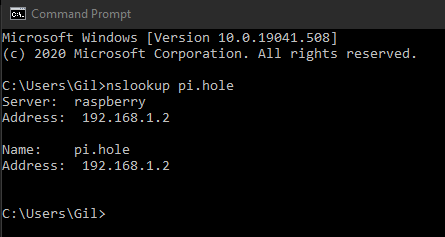
Please share whether _`nslookup`_ would still return your router as DNS server.
> [@Bucking\_Horn](#):
>
> Run from a **client** , what's the output of the following command:
>
> ```auto
> nslookup pi.hole
>
> ```
---
### Author:  [@gil80](https://discourse.pi-hole.net/u/gil80)
#### Post date: [October 9, 2020, 3:32pm UTC](https://discourse.pi-hole.net/t/pi-hole-doesnt-block-according-to-dashboard/39178/14 "2020-10-09T15:32:40Z")
here's the screenshot of that:
---
### Author:  [@Bucking\_Horn](https://discourse.pi-hole.net/u/Bucking_Horn)
#### Post date: [October 9, 2020, 3:42pm UTC](https://discourse.pi-hole.net/t/pi-hole-doesnt-block-according-to-dashboard/39178/15 "2020-10-09T15:42:34Z")
Looking good so far: Your Windows machine is using Pi-hole as DNS server, at least for that request.
Let's try to figure out whether Pi-hole would be blocking unwanted requests correctly:
```auto
nslookup flurry.com
```
That should return a `0.0.0.0` address.
And let's have a closer look at all DNS servers that your Windows knows about:
```auto
netsh interface ipv4 show dnsservers
netsh interface ipv6 show dnsservers
```
---
### Author:  [@gil80](https://discourse.pi-hole.net/u/gil80)
#### Post date: [October 10, 2020, 3:15am UTC](https://discourse.pi-hole.net/t/pi-hole-doesnt-block-according-to-dashboard/39178/16 "2020-10-10T03:15:17Z")
doesn't look good. new debug token at the bottom.

ipv6
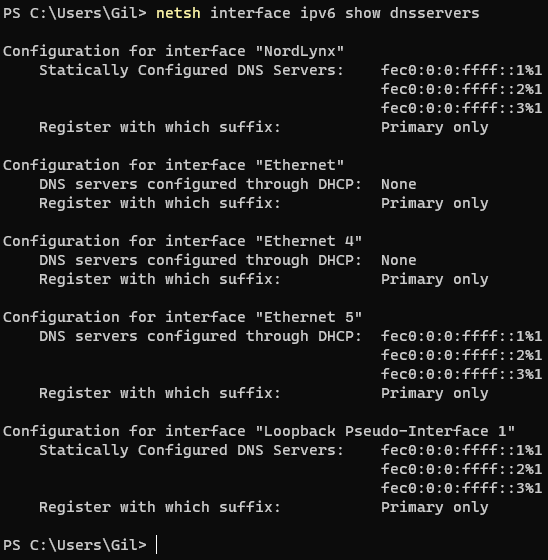
ipv4
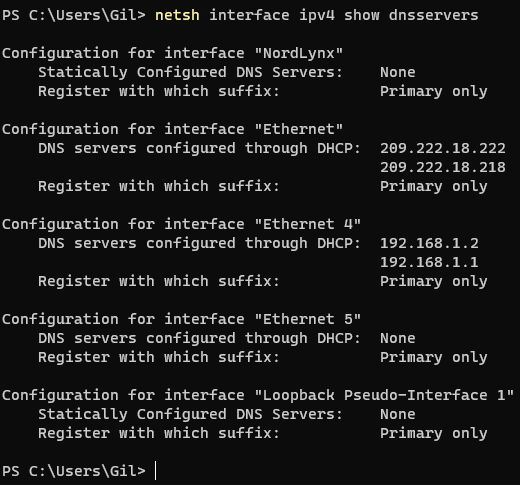
[https://tricorder.pi-hole.net/0zpsas9w5y](https://tricorder.pi-hole.net/0zpsas9w5y)
---
### Author:  [@jfb](https://discourse.pi-hole.net/u/jfb)
#### Post date: [October 10, 2020, 3:18am UTC](https://discourse.pi-hole.net/t/pi-hole-doesnt-block-according-to-dashboard/39178/17 "2020-10-10T03:18:57Z")
From your debug log of two days ago, all your blocking is applied to groups 1, 2 and 3, but your clients are all in group 0. Nothing is being blocked.
```auto
** [DIAGNOSING]: Groups
id enabled name date_added date_modified description
---- ------- -------------------------------------------------- ------------------- ------------------- --------------------------------------------------
0 1 Default 2020-10-08 00:10:53 2020-10-08 00:10:53 The default group
1 1 Suspicious lists 2020-10-08 17:11:11 2020-10-08 17:11:11
2 1 Advertising lists 2020-10-08 17:11:12 2020-10-08 17:11:12
3 1 Tracking Aggressive 2020-10-08 17:11:13 2020-10-08 17:11:13
4 1 AMP Hosts 2020-10-08 17:11:14 2020-10-08 17:11:14
*** [DIAGNOSING]: Domainlist (0/1 = exact white-/blacklist, 2/3 = regex white-/blacklist)
*** [DIAGNOSING]: Clients
*** [DIAGNOSING]: Adlists
id enabled group_ids address date_added date_modified comment
---- ------- ------------ ---------------------------------------------------------------------------------------------------- ------------------- ------------------- --------------------------------------------------
1 1 2 https://raw.githubusercontent.com/StevenBlack/hosts/master/hosts 2020-10-08 00:10:53 2020-10-08 17:11:36 Migrated from /etc/pihole/adlists.list
2 1 2 https://mirror1.malwaredomains.com/files/justdomains 2020-10-08 00:10:53 2020-10-08 17:11:44 Migrated from /etc/pihole/adlists.list
3 1 1 https://raw.githubusercontent.com/PolishFiltersTeam/KADhosts/master/KADhosts_without_controversies.t 2020-10-08 17:04:38 2020-10-08 17:16:58 Taken from https://firebog.net/
4 1 1 https://raw.githubusercontent.com/FadeMind/hosts.extras/master/add.Spam/hosts 2020-10-08 17:05:10 2020-10-08 17:16:48 Taken from https://firebog.net/
5 1 1 https://v.firebog.net/hosts/static/w3kbl.txt 2020-10-08 17:05:28 2020-10-08 17:16:26 Taken from https://firebog.net/
6 1 2,3 https://www.github.developerdan.com/hosts/lists/ads-and-tracking-extended.txt 2020-10-08 17:08:54 2020-10-08 17:15:31 Taken from https://www.github.developerdan.com/hos
8 1 2 https://raw.githubusercontent.com/Gil80/pihole-blocklist/main/stlblock.txt 2020-10-08 18:25:26 2020-10-08 18:25:35 Taken from my repo
```
---
### Author:  [@Bucking\_Horn](https://discourse.pi-hole.net/u/Bucking_Horn)
#### Post date: [October 10, 2020, 4:56am UTC](https://discourse.pi-hole.net/t/pi-hole-doesnt-block-according-to-dashboard/39178/18 "2020-10-10T04:56:47Z")
Your IPv6 DNS servers look ok.
_`fec0:0:0:ffff::1`_ to _`::3`_ are site-local anycast addresses for DNS servers - long deprecated, but Windows still statically defines them in absence of any other DNS severs.
This would be in line with your network not having IPv6 connectivity, as indicated by your debug log (by link-local _`fe80`_ address only, no IPv6 gateway). (_And you don't need IPv6 to access the Internet at all_.)
In short: Nothing to worry about.
For IPv4 however, there are indeed 3 additional DNS servers: Your router at 192.168.1.1 on your "Ethernet 4" interface, and two public ones on your "Ethernet" interface.
While the latter probably stems from a VPN setup presumably using PIA (privateinternetaccess) as a VPN provider, the former is proving that your router is configured to distribute itself alongside Pi-hole as DNS server.
You should get rid of that router entry in your router's DNS settings, or any client **will** bypass Pi-hole over time as a client sees fit.
Any contact established via the presumed VPN connection will also not being filtered through Pi-hole.
You'd have to consult your VPN provider if and how you can inject a custom DNS server into your VPN connection.
And finally, you should also heed **jfb**'s above advice on verifying your group management in Pi-hole.
---
### Author:  [@gil80](https://discourse.pi-hole.net/u/gil80)
#### Post date: [October 10, 2020, 5:40am UTC](https://discourse.pi-hole.net/t/pi-hole-doesnt-block-according-to-dashboard/39178/19 "2020-10-10T05:40:22Z")
> [@jfb](#):
>
> From your debug log of two days ago, all your blocking is applied to groups 1, 2 and 3, but your clients are all in group 0. Nothing is being blocked.
> [@Bucking\_Horn](#):
>
> For IPv4 however, there are indeed 3 additional DNS servers: Your router at 192.168.1.1 on your "Ethernet 4" interface, and two public ones on your "Ethernet" interface.
> While the latter probably stems from a VPN setup presumably using PIA (privateinternetaccess) as a VPN provider, the former is proving that your router is configured to distribute itself alongside Pi-hole as DNS server.
>
> You should get rid of that router entry in your router's DNS settings, or any client **will** bypass Pi-hole over time as a client sees fit.
>
> Any contact established via the presumed VPN connection will also not being filtered through Pi-hole.
> You'd have to consult your VPN provider if and how you can inject a custom DNS server into your VPN connection.
I think the whole setup process got me misled.
I understood that if I set the router's DNS to the pi-hole IP address, then all my devices at home will go through pi-hole.
The youtube videos I've seen were all saying that you either set few clients (devices) to use the pi-hole IP as a DNS or you set the router's DNS to use pi-hole IP to get all the devices covered.
So I don't understand what do I need to do now? No guide is saying to do anything other than those I just mentioned.
I read your explanations but it just doesn't sink in. sorry for being a dumbass. I really don't get it. What steps did I miss?
What does it matter if I have adlists divided into groups, as long as the router is using the pi-hole's IP as a DNS?
I don't use PIA. I have NordVPN software but it's switched off. This is mainly used on my PC and my Nvidia Shield TV.
Other than this, most of my clients don't use a VPN.
I only have my PC and the raspberry connected via Ethernet. All other home clients use WiFi.
Can you please guide me what to do?
And should I enable IPv6?
Please have a look at the debug log on my previous post, as I have done some changes.
I've set Interface listening behavior to **Listen on all interfaces, permit all origins**
---
### Author:  [@Bucking\_Horn](https://discourse.pi-hole.net/u/Bucking_Horn)
#### Post date: [October 10, 2020, 6:05am UTC](https://discourse.pi-hole.net/t/pi-hole-doesnt-block-according-to-dashboard/39178/20 "2020-10-10T06:05:04Z")
> [@gil80](#):
>
> And should I enable IPv6?
> [@Bucking\_Horn](#):
>
> _you don't need IPv6 to access the Internet at all_ .)
> In short: Nothing to worry about.
I add to that that your ISP may not even offer IPv6 connectivity at all.
Even if, my recommendation would be to keep it disabled.
IPv6 takes quite a bit to get a grasp of. You should solve your current issues first before introducing any additional challenges by enabling IPv6.
> [@gil80](#):
>
> Can you please guide me what to do?
> [@Bucking\_Horn](#):
>
> get rid of that router entry in your router's DNS settings
> [@Bucking\_Horn](#):
>
> consult your VPN provider if and how you can inject a custom DNS server into your VPN connection.
> [@Bucking\_Horn](#):
>
> heed **jfb**'s above advice on verifying your group management
I'll have a look at your current debug log to see if your latest changes would fit **jfb's** group management advice.
But you'd have to figure your router and VPN by yourself.
I do not know your router nor your VPN provider.
That said, there are some misbehaving routers that will distribute their own IP as additional DNS, no matter what you configure.
---
### Author:  [@Bucking\_Horn](https://discourse.pi-hole.net/u/Bucking_Horn)
#### Post date: [October 11, 2020, 11:14am UTC](https://discourse.pi-hole.net/t/pi-hole-doesnt-block-according-to-dashboard/39178/21 "2020-10-11T11:14:47Z")
10 posts were split to a new topic: [Pi-hole not blocking ads with Asus RT-AX88U](https://discourse.pi-hole.net/t/pi-hole-not-blocking-ads-with-asus-rt-ax88u/39295)
[Next page](https://discourse.pi-hole.net/t/pi-hole-doesnt-block-according-to-dashboard/39178.md?page=2)