# Pi.hole cannot be found

**URL:** https://discourse.pi-hole.net/t/pi-hole-cannot-be-found/17889
**Category:** Help
**Created:** [March 1, 2019, 6:38pm UTC](https://discourse.pi-hole.net/t/pi-hole-cannot-be-found/17889 "2019-03-01T18:38:18Z")
**Posts on this page:** 13
**Page:** 1

<div class="post-metadata">

### Author: ![nirolo](https://discourse-cdn.pi-hole.net/letter_avatar_proxy/v4/letter/n/7993a0/32.png) [@nirolo](https://discourse.pi-hole.net/u/nirolo)
#### Post date: [March 1, 2019, 6:38pm UTC](https://discourse.pi-hole.net/t/pi-hole-cannot-be-found/17889/1 "2019-03-01T18:38:18Z")

</div>

## Expected Behaviour:

I'd expect my systems to route traffic through the pi-hole and be able to access the admin interface through "pi.hole".

## Actual Behaviour:

However, I can't access pi.hole. I can access the dashboard via the Raspberry Pi's IP. Ads do not get blocked.

## Debug Token:

[https://tricorder.pi-hole.net/zlwr250mif](https://tricorder.pi-hole.net/zlwr250mif)

For my setup:

1. Installed a new raspbian today
2. Installed pi-hole today
3. Configured my router to route DNS through the pi-hole. The pi has a static ip (192.168.11.6) which is configured as the only DNS server in my router (192.168.11.1), see figure below.

Initially I had the impression the pi-hole was working. The dashboard showed me a lot of queries and also blocks. But after a reboot (I relocated the hardware to its designated spot) I encounter the problems.

The nslookup also shows an error:

```auto
~> nslookup pi.hole 192.168.11.6
Server: 192.168.11.6
Address:	192.168.11.6#53

Name:	pi.hole
Address: 192.168.11.6

 ~> nslookup pi.hole
Server: 192.168.11.1
Address:	192.168.11.1#53

** server can't find pi.hole: NXDOMAIN

```

 ![image](https://discourse.pi-hole.net/uploads/default/original/2X/c/ce4921a0f5ea1439e2bfc845d8913ea38e450068.png)

I have the gut feeling this is connected to my router settings but I can't pin it yet.  
Reading

> [@How do I configure my devices to use Pi-hole as their DNS server?](https://discourse.pi-hole.net/t/how-do-i-configure-my-devices-to-use-pi-hole-as-their-dns-server/245):
>
> Three methods Generally, there are three different methods that will enable devices on your network to be protected by Pi-hole. 1. Define Pi-hole's IP address as the only DNS entry in the router Rationale Only is italicized here for a reason: Pi-hole needs to be the only DNS server because it intercepts queries and decides whether or not they should be blocked. If you have other DNS servers configured, you may be sent to the correct domain, bypassing Pi-hole completely. Because of this, we re…

Section 1. -\> Caveats -\> 2. : Is it even possible to reach pi.hole this way? If I understand that post correct, I will not be able to reach the pi-hole without accessing the ip directly.

---

<div class="post-metadata">

### Author: ![nirolo](https://discourse-cdn.pi-hole.net/letter_avatar_proxy/v4/letter/n/7993a0/32.png) [@nirolo](https://discourse.pi-hole.net/u/nirolo)
#### Post date: [March 1, 2019, 7:24pm UTC](https://discourse.pi-hole.net/t/pi-hole-cannot-be-found/17889/2 "2019-03-01T19:24:40Z")

</div>

Works after another restart of all involved systems. Can't tell why.

---

<div class="post-metadata">

### Author: ![nirolo](https://discourse-cdn.pi-hole.net/letter_avatar_proxy/v4/letter/n/7993a0/32.png) [@nirolo](https://discourse.pi-hole.net/u/nirolo)
#### Post date: [March 16, 2019, 9:45pm UTC](https://discourse.pi-hole.net/t/pi-hole-cannot-be-found/17889/3 "2019-03-16T21:45:37Z")

</div>

A couple of day later the problem returned. This time it was not solved by a restart of the involved systems.  
I can access the dashboard via the pi's IP but not via `pi.hole` and again the nslookup throws errors and I see ads.

---

<div class="post-metadata">

### Author: ![DanSchaper](https://discourse-cdn.pi-hole.net/user_avatar/discourse.pi-hole.net/danschaper/32/91_2.png) [@DanSchaper](https://discourse.pi-hole.net/u/DanSchaper)
#### Post date: [March 16, 2019, 9:57pm UTC](https://discourse.pi-hole.net/t/pi-hole-cannot-be-found/17889/4 "2019-03-16T21:57:47Z")

</div>

If 192.168.11.6 responds with a proper IP for `pi.hole` then Pi-hole is configured correctly. Not having experience with that particular router I wouldn't know what settings are needed to have it's internal DNS correctly forward queries to the Pi-hole.

When the problem is happening are there any queries shown in the admin panel query log? Can you run `pihole -d` and provide us with the token link so that we can check some basic configuration settings for correctness?

---

<div class="post-metadata">

### Author: ![deHakkelaar](https://discourse-cdn.pi-hole.net/user_avatar/discourse.pi-hole.net/dehakkelaar/32/674_2.png) [@deHakkelaar](https://discourse.pi-hole.net/u/deHakkelaar)
#### Post date: [March 17, 2019, 2:45pm UTC](https://discourse.pi-hole.net/t/pi-hole-cannot-be-found/17889/5 "2019-03-17T14:45:14Z")

</div>

Also check if your router DHCP service dishes out the correct details to its clients using the `nmap` tool on Pi-hole:

> [@Pi-Hole not blocking ads](https://discourse.pi-hole.net/t/pi-hole-not-blocking-ads/16700/18):
>
> Sounds like the Asus router is pushing two DNS servers to the clients via DHCP: [https://discourse.pi-hole.net/t/why-are-adverts-on-some-domains-not-blocked/5972](https://discourse.pi-hole.net/t/why-are-adverts-on-some-domains-not-blocked/5972) If want to know for sure, install nmap on Pi-hole: sudo apt install nmap And do a DHCP discovery targeting the "\<ASUS\_ROUTER\_IP\_ADDRESS\>": sudo nmap -sU -p67 --script dhcp-discover \<ASUS\_ROUTER\_IP\_ADDRESS\>

---

<div class="post-metadata">

### Author: ![nirolo](https://discourse-cdn.pi-hole.net/letter_avatar_proxy/v4/letter/n/7993a0/32.png) [@nirolo](https://discourse.pi-hole.net/u/nirolo)
#### Post date: [March 18, 2019, 9:00am UTC](https://discourse.pi-hole.net/t/pi-hole-cannot-be-found/17889/6 "2019-03-18T09:00:17Z")

</div>

nmap dhcp-discover result:

```auto
sudo nmap -sU -p67 --script dhcp-discover 192.168.11.1

Starting Nmap 7.40 ( https://nmap.org ) at 2019-03-18 08:55 GMT
Nmap scan report for 192.168.11.1
Host is up (-0.19s latency).
PORT STATE SERVICE
67/udp open|filtered dhcps
MAC Address: XX:24:XX:BC:39:XX (Buffalo.inc)

Nmap done: 1 IP address (1 host up) scanned in 12.47 seconds

```

[Debug token](https://tricorder.pi-hole.net/7e05hnwn9z!)

There are queries showing in the admin panel query log.

---

<div class="post-metadata">

### Author: ![deHakkelaar](https://discourse-cdn.pi-hole.net/user_avatar/discourse.pi-hole.net/dehakkelaar/32/674_2.png) [@deHakkelaar](https://discourse.pi-hole.net/u/deHakkelaar)
#### Post date: [March 18, 2019, 12:33pm UTC](https://discourse.pi-hole.net/t/pi-hole-cannot-be-found/17889/7 "2019-03-18T12:33:19Z")

</div>

I am not sure why `nmap` isnt able to capture DHCP from your router.  
Could be some safety mechanism on the router.  
If others dont provide a solution, my advice would be to disable the DHCP service on the router and enable it on Pi-hole:

> [@How do I use Pi-hole's built in DHCP server (and why would I want to)?](https://discourse.pi-hole.net/t/how-do-i-use-pi-holes-built-in-dhcp-server-and-why-would-i-want-to/3026):
>
> Using Your Existing Router For Network-wide Ad Blocking You might not need to use Pi-hole's DHCP server: In many home environments, your router also functions as your DHCP server. In this case, you can often [set Pi-hole to be the DNS server for your network clients in the router's DHCP (or LAN) settings page](https://discourse.pi-hole.net/t/how-do-i-configure-my-devices-to-use-pi-hole-as-their-dns-server/245), which allows all of your network clients to block ads simply by connecting to the network. Setting it up this way is also what makes Pi-hole very powerful for network-wide ad blocking. W…

---

<div class="post-metadata">

### Author: ![nirolo](https://discourse-cdn.pi-hole.net/letter_avatar_proxy/v4/letter/n/7993a0/32.png) [@nirolo](https://discourse.pi-hole.net/u/nirolo)
#### Post date: [March 20, 2019, 2:44pm UTC](https://discourse.pi-hole.net/t/pi-hole-cannot-be-found/17889/8 "2019-03-20T14:44:05Z")

</div>

Well then I'll probably have to

- either set the pi manually as my DNS server on each device
- wait for a new router
- find out why it worked for one day

I can't disable DHCP in the router 😕  
Thanks nevertheless for your efforts!

---

<div class="post-metadata">

### Author: ![deHakkelaar](https://discourse-cdn.pi-hole.net/user_avatar/discourse.pi-hole.net/dehakkelaar/32/674_2.png) [@deHakkelaar](https://discourse.pi-hole.net/u/deHakkelaar)
#### Post date: [March 20, 2019, 3:50pm UTC](https://discourse.pi-hole.net/t/pi-hole-cannot-be-found/17889/9 "2019-03-20T15:50:55Z")

</div>

> [@nirolo](#):
>
> I can’t disable DHCP in the router 😕
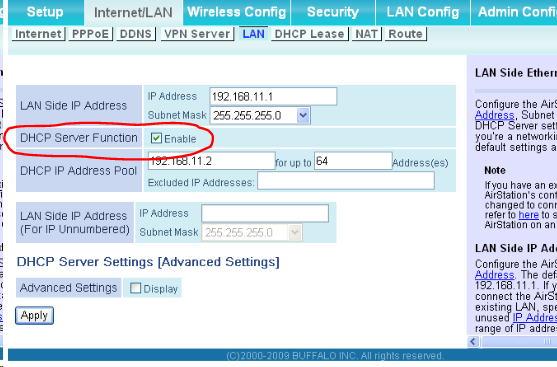
 ![image](https://discourse.pi-hole.net/uploads/default/original/2X/7/725e682f9c403b12922014a0d4865f0cf8be7219.png)

---

<div class="post-metadata">

### Author: ![jfb](https://discourse-cdn.pi-hole.net/user_avatar/discourse.pi-hole.net/jfb/32/4332_2.png) [@jfb](https://discourse.pi-hole.net/u/jfb)
#### Post date: [March 20, 2019, 6:04pm UTC](https://discourse.pi-hole.net/t/pi-hole-cannot-be-found/17889/10 "2019-03-20T18:04:17Z")

</div>

> [@nirolo](#):
>
> I can’t disable DHCP in the router

If you cannot disable DHCP on the router, then change the range of DHCP on the router to one IP address, the IP of the Pi-Hole. Then enable DHCP on the Pi-Hole and assign the range outside the IP of the Pi-Hole.

---

<div class="post-metadata">

### Author: ![nirolo](https://discourse-cdn.pi-hole.net/letter_avatar_proxy/v4/letter/n/7993a0/32.png) [@nirolo](https://discourse.pi-hole.net/u/nirolo)
#### Post date: [March 22, 2019, 12:01pm UTC](https://discourse.pi-hole.net/t/pi-hole-cannot-be-found/17889/11 "2019-03-22T12:01:06Z")

</div>

🙄 whoops. Thanks!

---

<div class="post-metadata">

### Author: ![nirolo](https://discourse-cdn.pi-hole.net/letter_avatar_proxy/v4/letter/n/7993a0/32.png) [@nirolo](https://discourse.pi-hole.net/u/nirolo)
#### Post date: [March 22, 2019, 12:28pm UTC](https://discourse.pi-hole.net/t/pi-hole-cannot-be-found/17889/12 "2019-03-22T12:28:36Z")

</div>

So, after a bit more trial and error I figured a way out to get it working again:

1. The pi-hole has to be up & running
2. The router has to be restarted

(in this order!)

It seems as if the the router is up while the pi-hole goes down it relies on a backup DNS that I cannot see or configure via the interface. If the pi-hole gets back up it does not switch to it as DNS server (even if I update the setting for the DNS server IP address). However, restarting the router does the job.  
Thanks for all your help so far!

---

<div class="post-metadata">

### Author: ![system](https://discourse.pi-hole.net/uploads/default/original/3X/7/c/7c8792f649eeb921c5d2b4c41564ffa873d9a2b8.png) [@system](https://discourse.pi-hole.net/u/system)
#### Post date: [April 12, 2019, 12:28pm UTC](https://discourse.pi-hole.net/t/pi-hole-cannot-be-found/17889/13 "2019-04-12T12:28:39Z")

</div>

This topic was automatically closed 21 days after the last reply. New replies are no longer allowed.
