Please follow the below template, it will help us to help you!
If you are Experiencing issues with a Pi-hole install that has non-standard elements (e.g you are using nginx, apache2 or another reverse proxy, or there is some other aspect of your install that is customised) - please use the Community Help category.
Expected Behaviour:
Pihole runs in a docker container on a raspberry pi and uses unbound in another container to to dns resolution. Has worked fine for years.
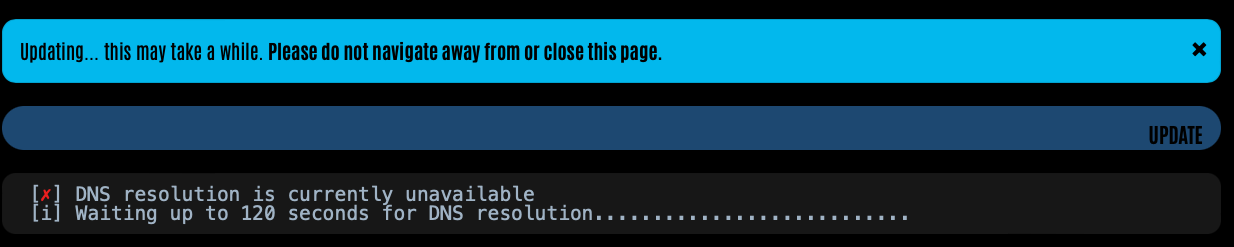
Gravity updates after selecting update on right of page
Recently ran another instance on my network on a intel nuc as i wanted redundancy as the pi is getting old. Set it all up and then shut down the new instance. Came back to the original version to find that it will not update gravity. Everything on the network is working fine, except gravity. I am not sure what I have done, but running a second instance seems to have broken something. I have checked online and in forums for a fix but all the comments about resolv.conf dont seem to work.
While waiting for this to go live , I did a bit more digging and a lot of banging my head against the wall . It turns out that the resolv.conf in the container had the wrong loop back address (127.0.0.11). I am not sure how this was changed given that its inside a container. Setting it back to 127.0.0.1 resolved the issue with the gravity not updating.
However, I still can not account for how it got changed in the first place. I have googled and searched for an answer to the following question, but could not find a good answer.
Question ?
How does running a second instance of pihole affect the first ?
Thanks for the reply. That makes things even stranger. As I said originally, I run unbound to do dns resolution and everything on the network works find. I can find things on the network and multiple computers have no issues finding the internet.
The router points to pihole, pihole points to unbound and unbound does its thing. Even after running the other instance unbound was still doing its thing for the network, it was just that pihole couldnt update gravity.
I tried adding other dns servers in the dns section and still no luck, until i changed the address to the above.
I will have to keep a check on things to see if my change has broken something else.
Also pihole and unbound run on the same Pi and use a dedicated docker network to communicate, which makes things even stranger
Ok having reverted the resolv.conf file back to 127.0.0.11, I can no longer update gravity, so back to square one.
version: '3.0'

networks:
  my_network:
    external: true

services:
  pihole:
    image: pihole/pihole:latest
    hostname: ${HOSTNAME} # Hermes
    domainname: ${DOMAIN_NAME} # pihole.local
    networks:
      my_network:
        ipv4_address: 172.23.0.7
    ports:
      - 443:443/tcp
      - 53:53/tcp
      - 53:53/udp
      - ${PIHOLE_WEBPORT:-80}:80/tcp #Allows use of different port to access pihole web interface when other docker containers use port 80
      #- 5335:5335/tcp # Uncomment to enable unbound access on local server
      # - 22/tcp # Uncomment to enable SSH
    environment:
      - FTLCONF_LOCAL_IPV4=${FTLCONF_LOCAL_IPV4} # 192.168.1.8
      - TZ=${TZ:-UTC} # 'United Kingdom/London'
      - WEBPASSWORD=${WEBPASSWORD} # Hades2P1h0le
      - WEBTHEME=${WEBTHEME:-default-light} # default-light
      - REV_SERVER=${REV_SERVER:-false} # true
      - REV_SERVER_TARGET=${REV_SERVER_TARGET} # 192.168.1.1
      - REV_SERVER_DOMAIN=${REV_SERVER_DOMAIN} # local
      - REV_SERVER_CIDR=${REV_SERVER_CIDR} # 192.168.0.0/24
      - PIHOLE_DNS_=172.23.0.8#5335
      - DNSSEC="true"
      - DNSMASQ_LISTENING=single
    volumes:
      - /mnt/pihole/:/etc/pihole/
      - /mnt/dnsmasq.d/:/etc/dnsmasq.d/
    restart: unless-stopped

  unbound:
    container_name: unbound
    image: mvance/unbound-rpi:latest # remember to change this if you're using rpi
    networks:
      my_network:
        ipv4_address: 172.23.0.8
    volumes:
      - /mnt/unbound:/opt/unbound/etc/unbound
    ports:
      - "5335:53/tcp"
      - "5335:53/udp"
    healthcheck:
      test: ["NONE"]
    restart: unless-stopped
This is the yml file, I am running version 6 on a pi 4 and am now wondering if something has changed in version 6 of pihole that I need to account for in the yml file.
There is no reason to suspect this compose file is using macvlan.
If it were a macvlan network, the compose file should specify external: true in the networks section and the containers should not include a ports: section (ports are ignored when using macvlan).
I have cleaned up both sets of yaml code and removed those that are no longer needed.
along with renaming those that are.
Both instances have a network that is a bridge network and have a fixed ipaddress in the range of 172.23.0.0/24. with the pihole at 7 and unbound at 8.
Instance 1 runs on a pi4
Instance 2 runs on a Itel Nuc 3
Both resolve dns requests for everything on the network without any issues. Instance 2 can update gravity and yet instance 1 cant, and that is what is baffling me at the moment ?
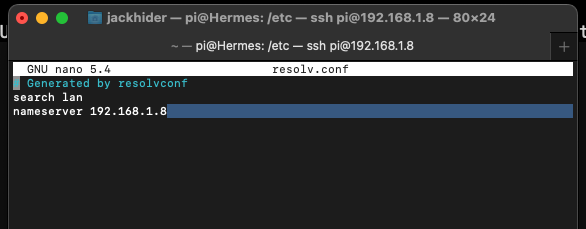

 . It turns out that the resolv.conf in the container had the wrong loop back address (127.0.0.11). I am not sure how this was changed given that its inside a container. Setting it back to 127.0.0.1 resolved the issue with the gravity not updating.

