# DHCP on Connect Box (UPC) IPv4 - Help
**URL:** https://discourse.pi-hole.net/t/dhcp-on-connect-box-upc-ipv4-help/14027
**Category:** Help
**Created:** [October 28, 2018, 2:07pm UTC](https://discourse.pi-hole.net/t/dhcp-on-connect-box-upc-ipv4-help/14027 "2018-10-28T14:07:28Z")
**Posts on this page:** 19
**Page:** 1
### Author:  [@kamyrdol32](https://discourse.pi-hole.net/u/kamyrdol32)
#### Post date: [October 28, 2018, 2:07pm UTC](https://discourse.pi-hole.net/t/dhcp-on-connect-box-upc-ipv4-help/14027/1 "2018-10-28T14:07:28Z")
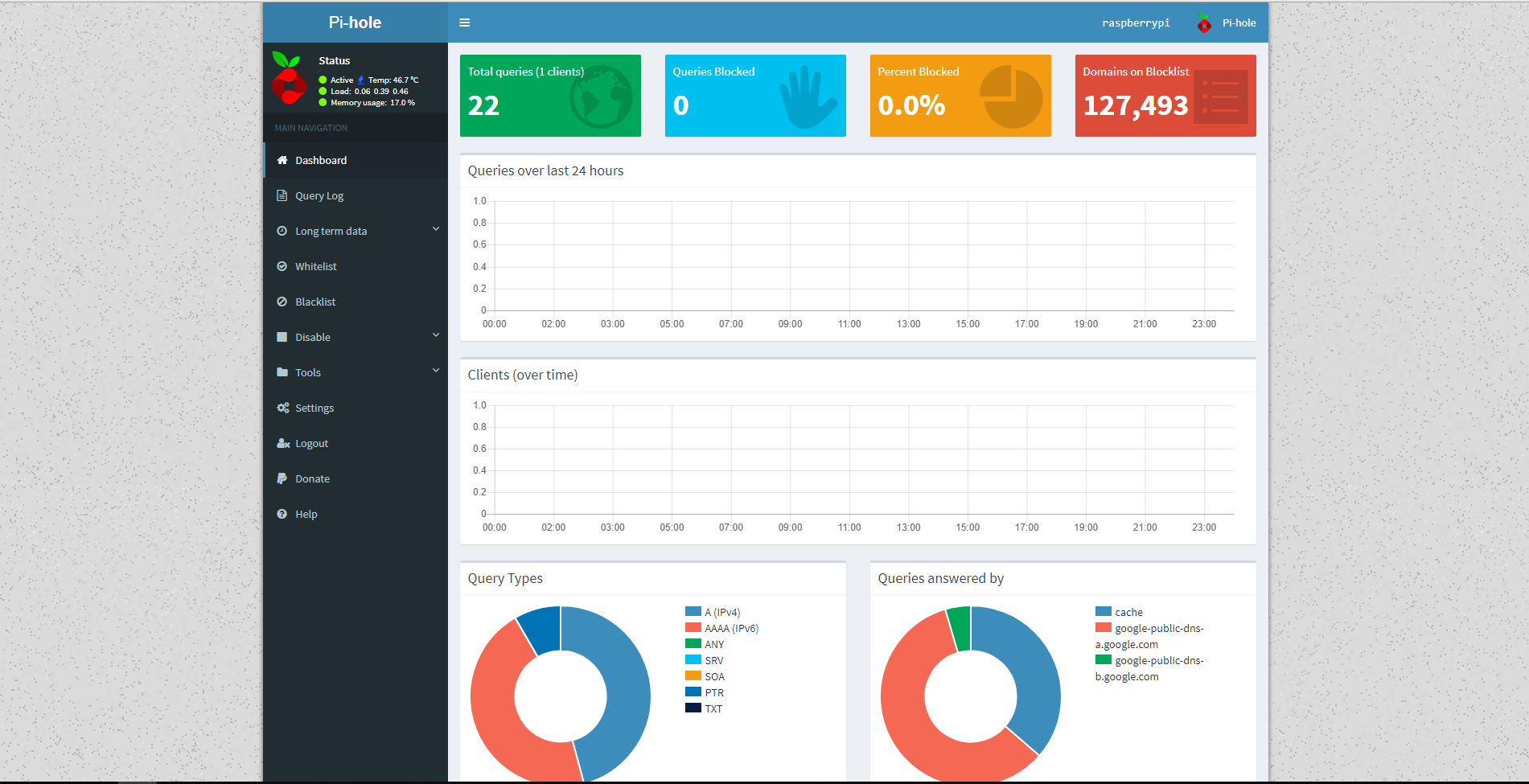
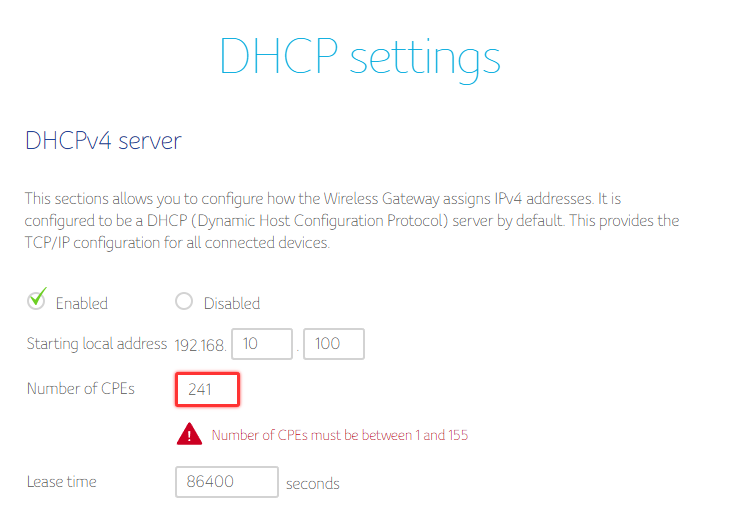
Hello, i have problem with configuration DHCP. I'm new user Pi-Hole, today i installed Pi-Hole on RasberryPi 3 B+, it work but i don't know what i must do in Connect Box (DHCP).
RasberryPi IP: 192.168.0.241
IPv4, wlan0
Someone is able to help me with the configuration of this?
---
### Author:  [@jfb](https://discourse.pi-hole.net/u/jfb)
#### Post date: [October 28, 2018, 3:01pm UTC](https://discourse.pi-hole.net/t/dhcp-on-connect-box-upc-ipv4-help/14027/2 "2018-10-28T15:01:58Z")
Please send us the token generated by
```auto
pihole -d
```
or do it through the Web interface:
> [@How do I debug my Pi-hole installation?](https://discourse.pi-hole.net/t/how-do-i-debug-my-pi-hole-installation/3104):
>
> Login into your Pi-hole's command line Enter sudo pihole -d Provide us with the debug token that is generated after the debug script completes Alternative: Securely sending us additional information Preferred Method If there is additional information you want to provide us, you can upload any kind of text to our server. You will still get a debug token so your information will remain anonymous. To do this, you can pipe some shell output into netcat, which will upload it to our [secure server](https://pi-hole.net/2016/11/07/crack-our-medical-tricorder-win-a-raspberry-pi-3/). …
---
### Author:  [@kamyrdol32](https://discourse.pi-hole.net/u/kamyrdol32)
#### Post date: [October 28, 2018, 3:17pm UTC](https://discourse.pi-hole.net/t/dhcp-on-connect-box-upc-ipv4-help/14027/3 "2018-10-28T15:17:38Z")
Token is bbjlvnggrp
---
### Author:  [@jfb](https://discourse.pi-hole.net/u/jfb)
#### Post date: [October 28, 2018, 3:19pm UTC](https://discourse.pi-hole.net/t/dhcp-on-connect-box-upc-ipv4-help/14027/4 "2018-10-28T15:19:37Z")
I removed your link to your debug log, as we can access the debug from the token you provide.
The debug logs upload to a server and are automatically deleted in 48 hours. Only a few people have access to your debug log. This is done to protect your privacy, as debug logs may contain personal information.
---
### Author:  [@kamyrdol32](https://discourse.pi-hole.net/u/kamyrdol32)
#### Post date: [October 28, 2018, 3:27pm UTC](https://discourse.pi-hole.net/t/dhcp-on-connect-box-upc-ipv4-help/14027/6 "2018-10-28T15:27:33Z")
Ahh, OK 😃 , I understand. But what can i do to run Pi-Hole?
---
### Author:  [@jfb](https://discourse.pi-hole.net/u/jfb)
#### Post date: [October 28, 2018, 3:33pm UTC](https://discourse.pi-hole.net/t/dhcp-on-connect-box-upc-ipv4-help/14027/7 "2018-10-28T15:33:09Z")
Your debug log shows that there is not an IPv4 IP address assigned to the ethernet interface, which is what you have Pi-Hole configured to listen on.
The Pi-Hole IP that you think the Pi is assigned (192.168.0.241) is not on the same subnet that you are showing in the DHCP settings on the router (192.168.10.100).
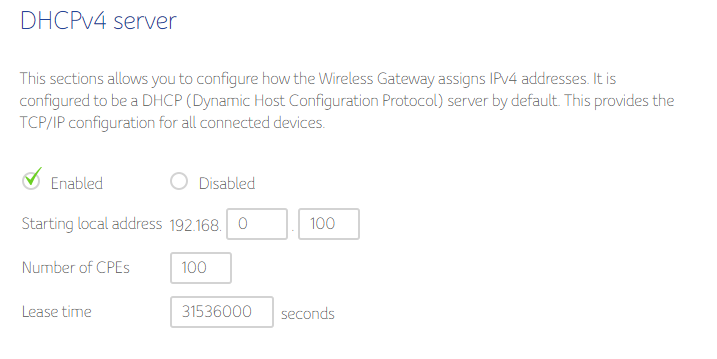
It appears that your DHCP settings on the router should be starting local address 192.168.0.100. Then number of CPE's 100 (this will give you IP addresses in the range of 100-200.
Then reboot the Pi, and check the router clients list to see which IP the Pi received. Then you make that reservation reserved or static on the router (so it won't change in the future).
Lastly, run this command to reconfigure the Pi-Hole to use the WAN IP address that you reserved above.
`pihole -r` and select "reconfigure"
---
### Author:  [@kamyrdol32](https://discourse.pi-hole.net/u/kamyrdol32)
#### Post date: [October 28, 2018, 4:11pm UTC](https://discourse.pi-hole.net/t/dhcp-on-connect-box-upc-ipv4-help/14027/8 "2018-10-28T16:11:40Z")
1. I changed DHCP
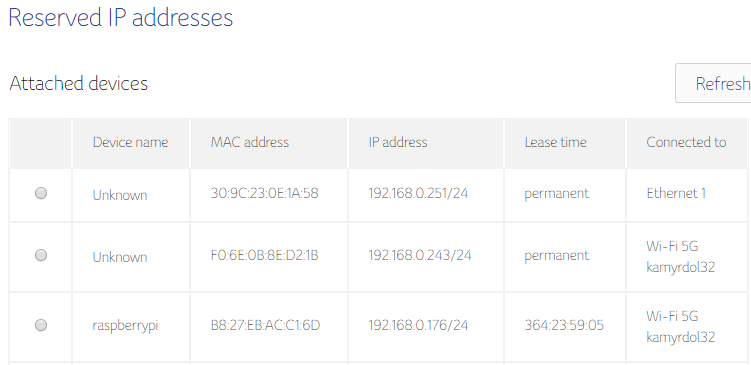
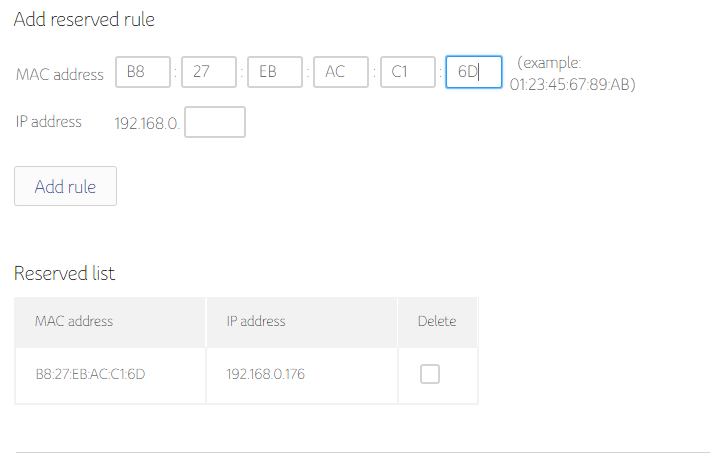
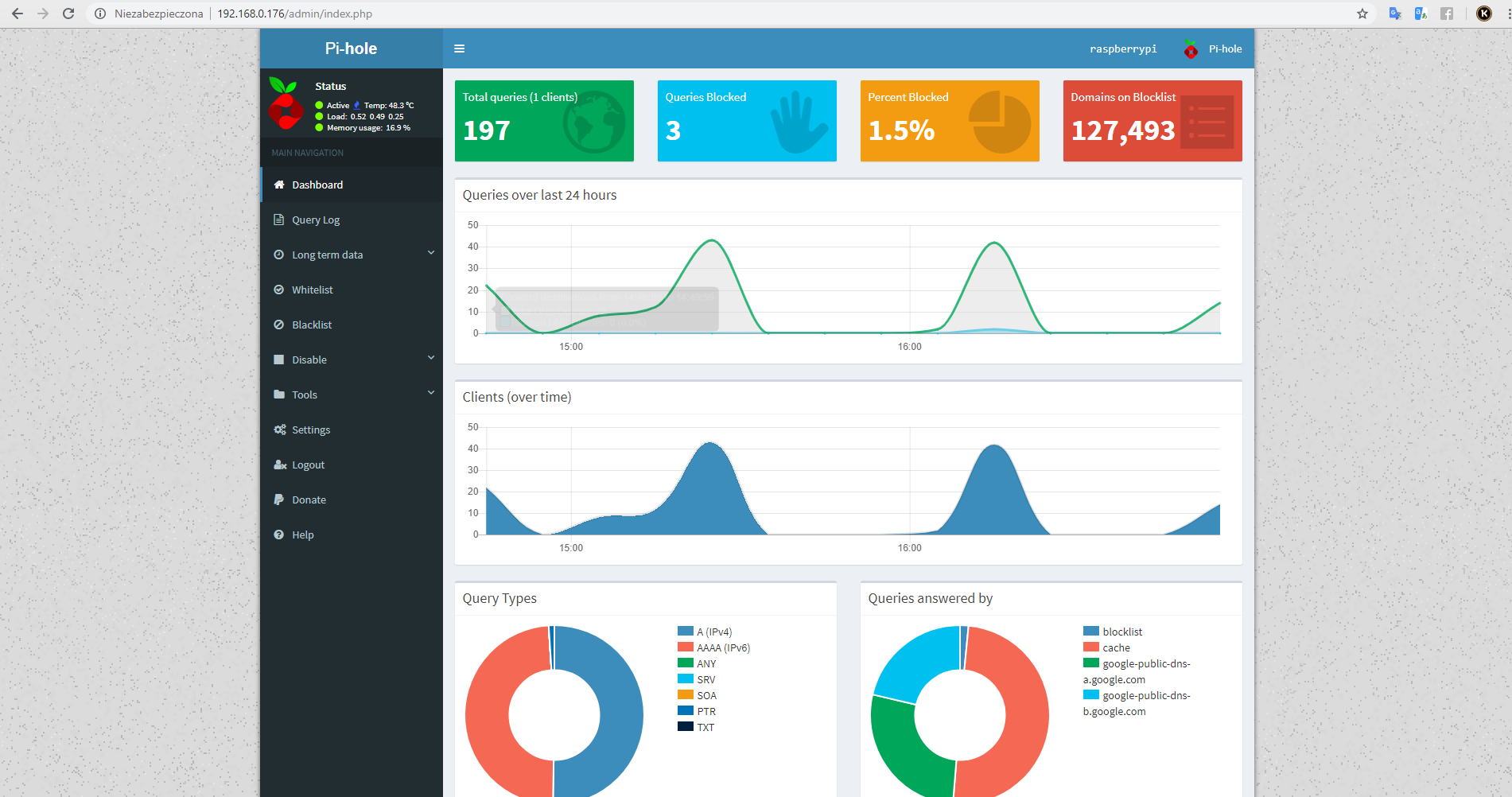
1. I reconfigurated Pi-Hole and now i set wlan0 (RasberryPi is connected by Wi-FI)
And no work :C . Propably i make mistake, i'm not learning about Internet Interfaces and Systems.
---
### Author:  [@jfb](https://discourse.pi-hole.net/u/jfb)
#### Post date: [October 28, 2018, 4:21pm UTC](https://discourse.pi-hole.net/t/dhcp-on-connect-box-upc-ipv4-help/14027/9 "2018-10-28T16:21:34Z")
First thought - a DHCP lease time of 60 years is excessive.
Upload another debug log and post the token here.
---
### Author:  [@kamyrdol32](https://discourse.pi-hole.net/u/kamyrdol32)
#### Post date: [October 28, 2018, 4:27pm UTC](https://discourse.pi-hole.net/t/dhcp-on-connect-box-upc-ipv4-help/14027/10 "2018-10-28T16:27:38Z")
Token: kqsl3ndoa7
---
### Author:  [@jfb](https://discourse.pi-hole.net/u/jfb)
#### Post date: [October 28, 2018, 4:35pm UTC](https://discourse.pi-hole.net/t/dhcp-on-connect-box-upc-ipv4-help/14027/12 "2018-10-28T16:35:44Z")
This log shows that you how have an IP address of 192.168.0.176 on the WLAN interface of the Pi. The Pi-Hole is working as shown on this section of your debug log:
```
*** [DIAGNOSING]: Name resolution (IPv4) using a random blocked domain and a known ad-serving domain
[✓] www.nysubwayoffer.com is 0.0.0.0 via localhost (127.0.0.1)
[✓] www.nysubwayoffer.com is 0.0.0.0 via Pi-hole (192.168.0.176)
[✓] doubleclick.com is 172.217.16.46 via a remote, public DNS server (8.8.8.8)
```
The problem is in your router and/or clients. After you made this change, did you change the DNS on your router to this IP (and only this IP)? Also, your clients will all need to renew their leases after the router is setup.
> [@Why should Pi-hole be my only DNS server?](https://discourse.pi-hole.net/t/why-should-pi-hole-be-my-only-dns-server/3376):
>
> Reduced Ad Blocking Capability The main reason you should Pi-hole as your only DNS server is that you will see increased performance in the blocking of ads. If you have two DNS servers (Pi-hole and something else), your network clients may not always query Pi-hole for name resolution. If a query happens to be answered from a non-Pi-hole DNS server, your block lists will not apply (since that DNS server doesn't know about them). All Queries Need To Go Through Pi-hole First Since other DNS serv…
> [@How do I configure my devices to use Pi-hole as their DNS server?](https://discourse.pi-hole.net/t/how-do-i-configure-my-devices-to-use-pi-hole-as-their-dns-server/245):
>
> Three methods Generally, there are three different methods that will enable devices on your network to be protected by Pi-hole. 1. Define Pi-hole's IP address as the only DNS entry in the router Rationale Only is italicized here for a reason: Pi-hole needs to be the only DNS server because it intercepts queries and decides whether or not they should be blocked. If you have other DNS servers configured, you may be sent to the correct domain, bypassing Pi-hole completely. Because of this, we re…
---
### Author:  [@kamyrdol32](https://discourse.pi-hole.net/u/kamyrdol32)
#### Post date: [October 29, 2018, 2:23pm UTC](https://discourse.pi-hole.net/t/dhcp-on-connect-box-upc-ipv4-help/14027/13 "2018-10-29T14:23:07Z")
I factory reset my router, change DNS on my PC and work! Tkanks!
---
### Author:  [@kamyrdol32](https://discourse.pi-hole.net/u/kamyrdol32)
#### Post date: [October 29, 2018, 9:43pm UTC](https://discourse.pi-hole.net/t/dhcp-on-connect-box-upc-ipv4-help/14027/14 "2018-10-29T21:43:12Z")
I restarted my rasberry PI and no work... Why...
---
### Author:  [@jfb](https://discourse.pi-hole.net/u/jfb)
#### Post date: [October 29, 2018, 10:17pm UTC](https://discourse.pi-hole.net/t/dhcp-on-connect-box-upc-ipv4-help/14027/15 "2018-10-29T22:17:09Z")
Upload another debug log and post the token here.
---
### Author:  [@kamyrdol32](https://discourse.pi-hole.net/u/kamyrdol32)
#### Post date: [October 30, 2018, 11:08am UTC](https://discourse.pi-hole.net/t/dhcp-on-connect-box-upc-ipv4-help/14027/16 "2018-10-30T11:08:05Z")
Token: 59w36lr59c
Maybe you can help me with that by TeamViewer?
---
### Author:  [@jfb](https://discourse.pi-hole.net/u/jfb)
#### Post date: [October 30, 2018, 5:14pm UTC](https://discourse.pi-hole.net/t/dhcp-on-connect-box-upc-ipv4-help/14027/17 "2018-10-30T17:14:24Z")
Your gravity list is empty:
```
*** [DIAGNOSING]: Gravity list
-rw-r--r-- 1 root root 0 Oct 29 16:09 /etc/pihole/gravity.list
-----head of gravity.list------
-----tail of gravity.list------
```
Set your Pi name server to a public IP to bypass the Pi-Hole, then update gravity:
`sudo nano /etc/resolv.conf`
Change 127.0.0.1 to 1.1.1.1 (or third party DNS of your choice) save and exit
`pihole -g`
---
### Author:  [@kamyrdol32](https://discourse.pi-hole.net/u/kamyrdol32)
#### Post date: [October 30, 2018, 6:08pm UTC](https://discourse.pi-hole.net/t/dhcp-on-connect-box-upc-ipv4-help/14027/18 "2018-10-30T18:08:05Z")
Now i cant connect to my raspberry pi, im outside the home. I will try do it od friday.
PS: I can do it if i dont have public IP? UPC give public IP only for commercial users.
"Set your Pi name server to a public IP to bypass the Pi-Hole, then update gravity:"
---
### Author:  [@Stan-qaz](https://discourse.pi-hole.net/u/Stan-qaz)
#### Post date: [October 30, 2018, 7:02pm UTC](https://discourse.pi-hole.net/t/dhcp-on-connect-box-upc-ipv4-help/14027/20 "2018-10-30T19:02:22Z")
You misunderstood the "Set your Pi name server to Public IP" suggestion.
You do not change the IP address of your PI, you change the IP address of the name server your Pi is using to resolve names.
Your file may differ but the 127.0.0.1 should be the same and is what you want to change to 1.1.1.1:
```
pi@pi-3b-1:~ $ cd /etc
pi@pi-3b-1:/etc $ cat resolv.conf
# Dynamic resolv.conf(5) file for glibc resolver(3) generated by resolvconf(8)
# DO NOT EDIT THIS FILE BY HAND -- YOUR CHANGES WILL BE OVERWRITTEN
nameserver 127.0.0.1
search home
pi@pi-3b-1:/etc $
```
---
### Author:  [@kamyrdol32](https://discourse.pi-hole.net/u/kamyrdol32)
#### Post date: [November 3, 2018, 11:03am UTC](https://discourse.pi-hole.net/t/dhcp-on-connect-box-upc-ipv4-help/14027/22 "2018-11-03T11:03:10Z")
It works! I will try not to restart Rasberry Pi 😄
---
### Author:  [@system](https://discourse.pi-hole.net/u/system)
#### Post date: [November 24, 2018, 11:03am UTC](https://discourse.pi-hole.net/t/dhcp-on-connect-box-upc-ipv4-help/14027/23 "2018-11-24T11:03:17Z")
This topic was automatically closed 21 days after the last reply. New replies are no longer allowed.