# Dashboard update problem
**URL:** https://discourse.pi-hole.net/t/dashboard-update-problem/52959
**Category:** Community Help
**Created:** [January 24, 2022, 7:40pm UTC](https://discourse.pi-hole.net/t/dashboard-update-problem/52959 "2022-01-24T19:40:42Z")
**Posts on this page:** 12
**Page:** 1
### Author:  [@popov](https://discourse.pi-hole.net/u/popov)
#### Post date: [January 24, 2022, 7:40pm UTC](https://discourse.pi-hole.net/t/dashboard-update-problem/52959/1 "2022-01-24T19:40:42Z")
The hole works fine- youtube ads get skipped, '[Pi-Hole Ad Tester – Fuzz The Pi Guy](https://fuzzthepiguy.tech/adtest/)' shows no ads.
But the dashboard seems to register none of the requests- all queries and general activity is uniform, and the 'Total' quary tally does not update either.
See screenshot.

---
### Author:  [@jfb](https://discourse.pi-hole.net/u/jfb)
#### Post date: [January 24, 2022, 10:47pm UTC](https://discourse.pi-hole.net/t/dashboard-update-problem/52959/4 "2022-01-24T22:47:23Z")
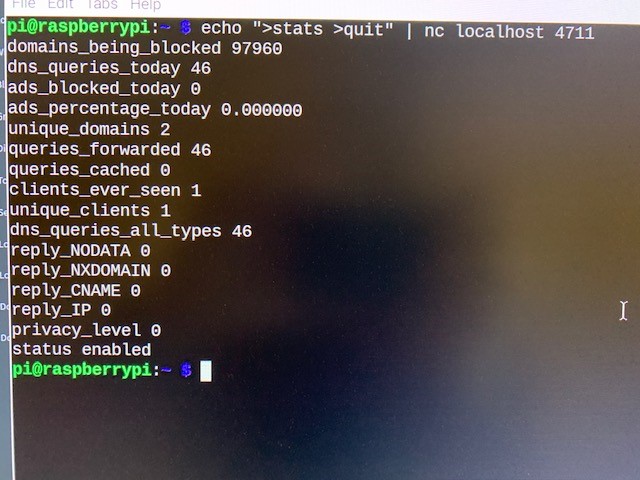
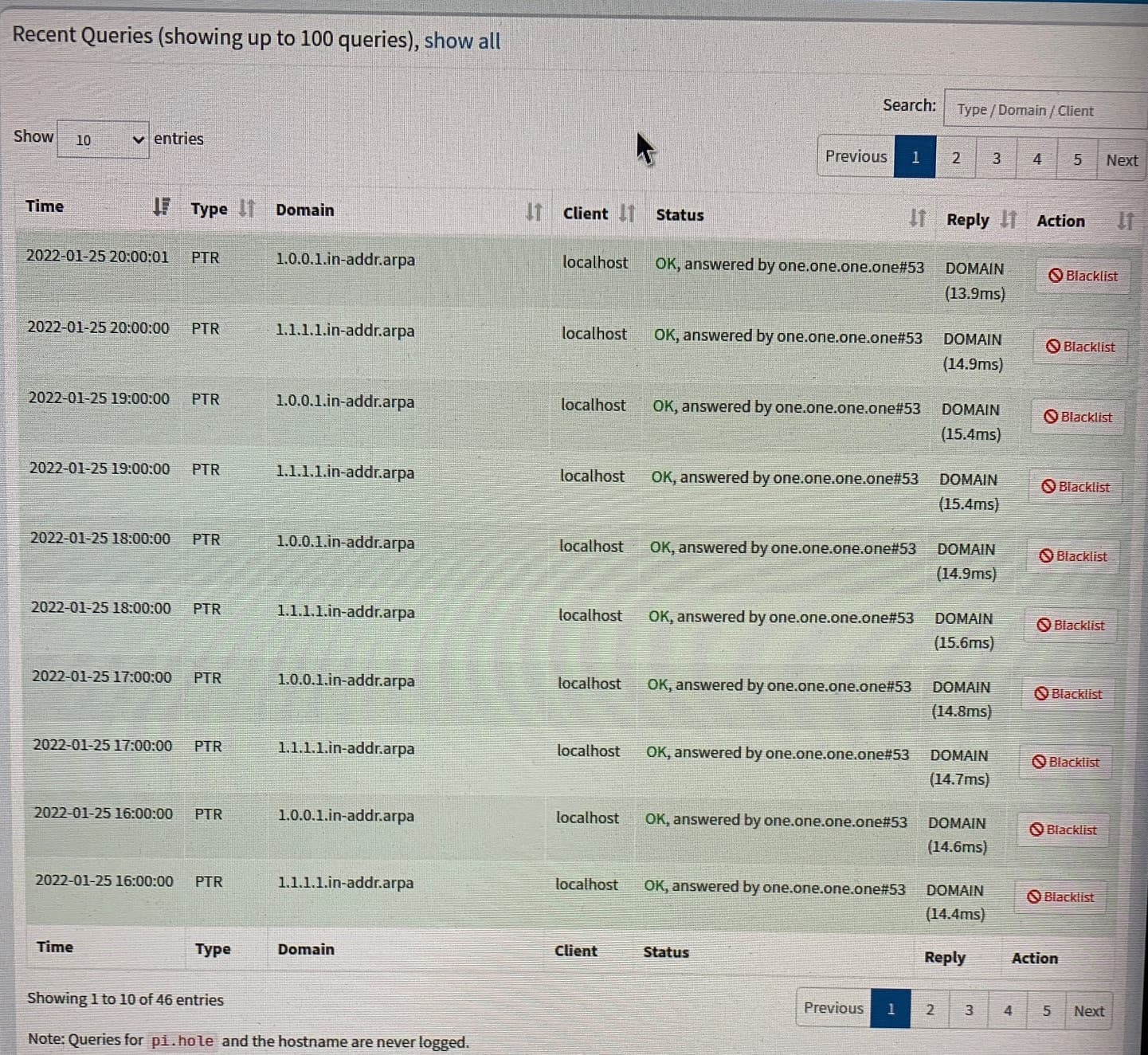
Are queries shown in the query log, or in the dnsmasq log at /var/log/pihole.log?
What is the output of the following command from the Pi terminal:
`echo ">stats >quit" | nc localhost 4711`
t looks from your screen shot that no clients are using Pi-hole. The hourly activity is Pi-hole polling clients on the network.
---
### Author:  [@popov](https://discourse.pi-hole.net/u/popov)
#### Post date: [January 25, 2022, 6:07pm UTC](https://discourse.pi-hole.net/t/dashboard-update-problem/52959/5 "2022-01-25T18:07:48Z")
Hi there! Indeed, the query log is populated (see photo).
The output of the command reflects the dashboard (see photo)
🤷♂️
---
### Author:  [@jfb](https://discourse.pi-hole.net/u/jfb)
#### Post date: [January 25, 2022, 6:52pm UTC](https://discourse.pi-hole.net/t/dashboard-update-problem/52959/6 "2022-01-25T18:52:42Z")
No clients are using Pi-hole.
From a client that you believe should be connected to the Pi-Hole for DNS, from the command prompt or terminal on that client (and not via ssh or Putty to the Pi), what is the output of
`nslookup pi.hole`
---
### Author:  [@popov](https://discourse.pi-hole.net/u/popov)
#### Post date: [January 25, 2022, 8:49pm UTC](https://discourse.pi-hole.net/t/dashboard-update-problem/52959/7 "2022-01-25T20:49:52Z")
Server: D-link.HomeGateway
Address: 192.168.1.1
\*\*\* D-link.HomeGateway can't find pi.hole: Non-existent domain
That's odd since the router does direct DNS requests to the pi-hole's address, and adblocking does seem to be working.
---
### Author:  [@jfb](https://discourse.pi-hole.net/u/jfb)
#### Post date: [January 25, 2022, 9:03pm UTC](https://discourse.pi-hole.net/t/dashboard-update-problem/52959/8 "2022-01-25T21:03:56Z")
> [@popov](#):
>
> That's odd since the router does direct DNS requests to the pi-hole's address
This does not appear to be working. Run these commands, which will direct the query to Pi-hole:
`nslookup pi.hole xxx`
`nslookup flurry.com xxx`
where **xxx** is the IP of your Pi-hole. An example would be `nslookup pi.hole 192.168.0.160`
> [@popov](#):
>
> adblocking does seem to be working.
Are you running an adblocker on the browser? Pi-hole isn't receiving or blocking any requests, so something else is blocking ads.
---
### Author:  [@popov](https://discourse.pi-hole.net/u/popov)
#### Post date: [January 25, 2022, 9:23pm UTC](https://discourse.pi-hole.net/t/dashboard-update-problem/52959/9 "2022-01-25T21:23:26Z")
> Blockquote
\*\*\* UnKnown can't find pi.hole: Non-existent domain
> Blockquote
I do have a browser adblocker. 🤦♂️
My router DNS settings point to my pi-hole IP and to cloudflare. OK thanks- so at least we know I'm somehow misconfigured, and that this isn't just a strange glitch.
---
### Author:  [@jfb](https://discourse.pi-hole.net/u/jfb)
#### Post date: [January 25, 2022, 9:38pm UTC](https://discourse.pi-hole.net/t/dashboard-update-problem/52959/10 "2022-01-25T21:38:22Z")
> [@popov](#):
>
> My router DNS settings point to my pi-hole IP and to cloudflare
Pi-hole should be your only DNS server. Given multiple DNS servers, clients are free to use any of them at any time, and this can result in some DNS traffic bypassing Pi-hole.
> [@popov](#):
>
> \*\*\* UnKnown can't find pi.hole: Non-existent domain
What was the exact command you ran?
Please upload a debug log and post **just the token URL** that is generated after the log is uploaded by running the following command from the Pi-hole host terminal:
```auto
pihole -d
```
or do it through the Web interface:
_ **Tools \> Generate Debug Log** _
---
### Author:  [@popov](https://discourse.pi-hole.net/u/popov)
#### Post date: [January 26, 2022, 12:55pm UTC](https://discourse.pi-hole.net/t/dashboard-update-problem/52959/11 "2022-01-26T12:55:05Z")
Done.
The token is [https://tricorder.pi-hole.net/nb7jF7i3/](https://tricorder.pi-hole.net/nb7jF7i3/)
I gave up on setting it up through the router, and after changing the DNS settings locally on the host, some blockings are showing up. It does seem to work then, only not optimally for me (through the router).
---
### Author:  [@jfb](https://discourse.pi-hole.net/u/jfb)
#### Post date: [January 26, 2022, 1:50pm UTC](https://discourse.pi-hole.net/t/dashboard-update-problem/52959/12 "2022-01-26T13:50:00Z")
> [@popov](#):
>
> My router DNS settings point to my pi-hole IP
They do not appear to:
```auto
*** [DIAGNOSING]: Discovering active DHCP servers (takes 10 seconds)
Scanning all your interfaces for DHCP servers
Timeout: 10 seconds
WARN: Could not sendto() in send_dhcp_discover() (/__w/FTL/FTL/src/dhcp-discover.c:233): Network is unreachable
* Received 288 bytes from eth0:192.168.1.1
Offered IP address: 192.168.1.9
Server IP address: N/A
Relay-agent IP address: N/A
BOOTP server: (empty)
BOOTP file: (empty)
DHCP options:
Message type: DHCPOFFER (2)
server-identifier: 192.168.1.1
lease-time: 3192 ( 53m 12s )
netmask: 255.255.255.0
router: 192.168.1.1
dns-server: 192.168.1.1
domain-name: "HomeGateway"
--- end of options ---
DHCP packets received on interface lo: 0
DHCP packets received on interface wlan0: 0
DHCP packets received on interface eth0: 1
```
You have the option of using Pi-hole as your DHCP server.
> [@How do I use Pi-hole's built in DHCP server (and why would I want to)?](https://discourse.pi-hole.net/t/how-do-i-use-pi-holes-built-in-dhcp-server-and-why-would-i-want-to/3026):
>
> Using Your Existing Router For Network-wide Ad Blocking You might not need to use Pi-hole's DHCP server: In many home environments, your router also functions as your DHCP server. In this case, you can often [set Pi-hole to be the DNS server for your network clients in the router's DHCP (or LAN) settings page](https://discourse.pi-hole.net/t/how-do-i-configure-my-devices-to-use-pi-hole-as-their-dns-server/245), which allows all of your network clients to block ads simply by connecting to the network. Setting it up this way is also what makes Pi-hole very powerful for network-wide ad blocking. W…
---
### Author:  [@popov](https://discourse.pi-hole.net/u/popov)
#### Post date: [January 26, 2022, 2:32pm UTC](https://discourse.pi-hole.net/t/dashboard-update-problem/52959/13 "2022-01-26T14:32:58Z")
I'll give it a try. Thanks 💪
---
### Author:  [@system](https://discourse.pi-hole.net/u/system)
#### Post date: [February 16, 2022, 2:33pm UTC](https://discourse.pi-hole.net/t/dashboard-update-problem/52959/14 "2022-02-16T14:33:43Z")
This topic was automatically closed 21 days after the last reply. New replies are no longer allowed.