# AT&T NVG599 cannot change DNS to point pi-hole server
**URL:** https://discourse.pi-hole.net/t/at-t-nvg599-cannot-change-dns-to-point-pi-hole-server/53688
**Category:** Community Help
**Created:** [February 18, 2022, 1:43am UTC](https://discourse.pi-hole.net/t/at-t-nvg599-cannot-change-dns-to-point-pi-hole-server/53688 "2022-02-18T01:43:15Z")
**Posts on this page:** 11
**Page:** 1
### Author:  [@itsmesri](https://discourse.pi-hole.net/u/itsmesri)
#### Post date: [February 18, 2022, 1:43am UTC](https://discourse.pi-hole.net/t/at-t-nvg599-cannot-change-dns-to-point-pi-hole-server/53688/1 "2022-02-18T01:43:16Z")
**The issue I am facing:**
AT&T NVG599 cannot change DNS to point pi-hole server
**Details about my system:**
I have installed the properly pi-hole server on Synology Using Docker With A MacVLAN And Bridge.
Network.
I can see only localhost as a client and my network device not showing as clients. After little research I found I need to change DNS to the router to point to pi-hole ip address. But I have ATT ARRIS NVG599 which I cannot change DNS. Please let me what is the other way I can bring clients to Pi-hole server.
I spoke to tech support he said all ATT modems don't allow DNS change. What have options?
---
### Author:  [@ShrewdGreyhound](https://discourse.pi-hole.net/u/ShrewdGreyhound)
#### Post date: [February 18, 2022, 2:47am UTC](https://discourse.pi-hole.net/t/at-t-nvg599-cannot-change-dns-to-point-pi-hole-server/53688/2 "2022-02-18T02:47:32Z")
I am not familiar with the AT&T router at all but your options would be:
1. Buying a secondary router and putting AT&T into bridge mode and connect it in. Plenty of guides, just google it
2. Entirely unfamiliar with this but finding a router compatible with AT&T connection just just disconnecting the old one, replacing it and entering all the proper ISP config details
---
### Author:  [@Blockhead](https://discourse.pi-hole.net/u/Blockhead)
#### Post date: [February 18, 2022, 2:53am UTC](https://discourse.pi-hole.net/t/at-t-nvg599-cannot-change-dns-to-point-pi-hole-server/53688/3 "2022-02-18T02:53:25Z")
Please follow these steps in order to disable the DHCP server:
1. Launch an Internet browser from a computer or wireless device that is connected to the network.
2. Type gateway's IP address and press Enter. The default IP address is 192.168.1.254. If you are asked to login, the device access code is on the side label.
3. Go to **Local Network \> Subnets & DHCP**.
4. Set **DHCP Server Enable** to **Off**.
5. Click **Save** so that the change takes effect.
Or if it doesn't have disable, the set the start and end IP addresses for the DHCP range to the IP for your pi-hole. Then enable pihole DHCP.
No guarantees!
---
### Author:  [@itsmesri](https://discourse.pi-hole.net/u/itsmesri)
#### Post date: [February 18, 2022, 4:11am UTC](https://discourse.pi-hole.net/t/at-t-nvg599-cannot-change-dns-to-point-pi-hole-server/53688/4 "2022-02-18T04:11:43Z")
I can do **DHCP Server Enable** to **Off**. on the router. After that Do I need to do anything all network clients traffic to pi-hole?
---
### Author:  [@Blockhead](https://discourse.pi-hole.net/u/Blockhead)
#### Post date: [February 18, 2022, 4:27am UTC](https://discourse.pi-hole.net/t/at-t-nvg599-cannot-change-dns-to-point-pi-hole-server/53688/5 "2022-02-18T04:27:21Z")
Enable pihole's DHCP server. It should set the DNS server to pihole's address. You can check by running ipconfig /all (on a Windows CMD prompt) and checking the DHCP and DNS info.
Especially if you set the DHCP range to cover your pihole static IP, you could set the pihole IP as a static address in pihole DHCP. Not sure if truly needed but seems to make sense.
Here's the overview:
> [@How do I use Pi-hole's built in DHCP server (and why would I want to)?](https://discourse.pi-hole.net/t/how-do-i-use-pi-holes-built-in-dhcp-server-and-why-would-i-want-to/3026):
>
> Using Your Existing Router For Network-wide Ad Blocking You might not need to use Pi-hole's DHCP server: In many home environments, your router also functions as your DHCP server. In this case, you can often [set Pi-hole to be the DNS server for your network clients in the router's DHCP (or LAN) settings page](https://discourse.pi-hole.net/t/how-do-i-configure-my-devices-to-use-pi-hole-as-their-dns-server/245), which allows all of your network clients to block ads simply by connecting to the network. Setting it up this way is also what makes Pi-hole very powerful for network-wide ad blocking. W…
---
### Author:  [@itsmesri](https://discourse.pi-hole.net/u/itsmesri)
#### Post date: [February 18, 2022, 4:44am UTC](https://discourse.pi-hole.net/t/at-t-nvg599-cannot-change-dns-to-point-pi-hole-server/53688/6 "2022-02-18T04:44:57Z")
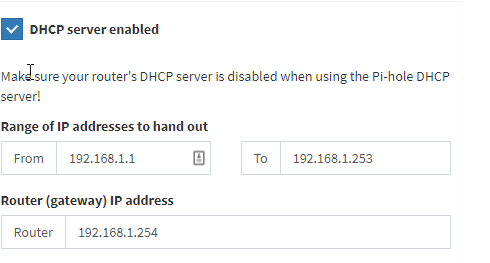
I have added 192.168.1.254 gateway address which is Router IP address. Pi-hole address is 192.168.1.11 and its gateway address also 192.168.1.254
And in DNS tab I selected google Upstream DNS Servers or do I need to change custom to gateway address?
---
### Author:  [@Blockhead](https://discourse.pi-hole.net/u/Blockhead)
#### Post date: [February 18, 2022, 4:49am UTC](https://discourse.pi-hole.net/t/at-t-nvg599-cannot-change-dns-to-point-pi-hole-server/53688/7 "2022-02-18T04:49:15Z")
Feels right to me, but only one way to find out!
I've only used custom when setting up the unbound alternative, which you could try after you've got a baseline:
> **[unbound - Pi-hole documentation](https://docs.pi-hole.net/guides/dns/unbound/)**
---
### Author:  [@itsmesri](https://discourse.pi-hole.net/u/itsmesri)
#### Post date: [February 18, 2022, 5:14am UTC](https://discourse.pi-hole.net/t/at-t-nvg599-cannot-change-dns-to-point-pi-hole-server/53688/8 "2022-02-18T05:14:10Z")
Now it is interesting. I see pi-hole working for LAN-connected devices. But wifi devices are still an issue. Wifi devices like mobiles wifi-connected laptops not showing in client.
---
### Author:  [@Blockhead](https://discourse.pi-hole.net/u/Blockhead)
#### Post date: [February 18, 2022, 5:28am UTC](https://discourse.pi-hole.net/t/at-t-nvg599-cannot-change-dns-to-point-pi-hole-server/53688/9 "2022-02-18T05:28:33Z")
I'm going to bow out now, good luck. I would look at the laptop's ipconfig to try to troubleshoot.
---
### Author:  [@itsmesri](https://discourse.pi-hole.net/u/itsmesri)
#### Post date: [February 18, 2022, 5:34am UTC](https://discourse.pi-hole.net/t/at-t-nvg599-cannot-change-dns-to-point-pi-hole-server/53688/10 "2022-02-18T05:34:32Z")
got it after reboot router all devices synced to pihole. Thank you verymuch
---
### Author:  [@system](https://discourse.pi-hole.net/u/system)
#### Post date: [March 11, 2022, 5:34am UTC](https://discourse.pi-hole.net/t/at-t-nvg599-cannot-change-dns-to-point-pi-hole-server/53688/11 "2022-03-11T05:34:59Z")
This topic was automatically closed 21 days after the last reply. New replies are no longer allowed.